
Please see the article on how to export ticket data if you need to know how to export the data you want to create a report on.
Once you have the data you want to report on extracted into a spreadsheet, you can then parse it to get information about
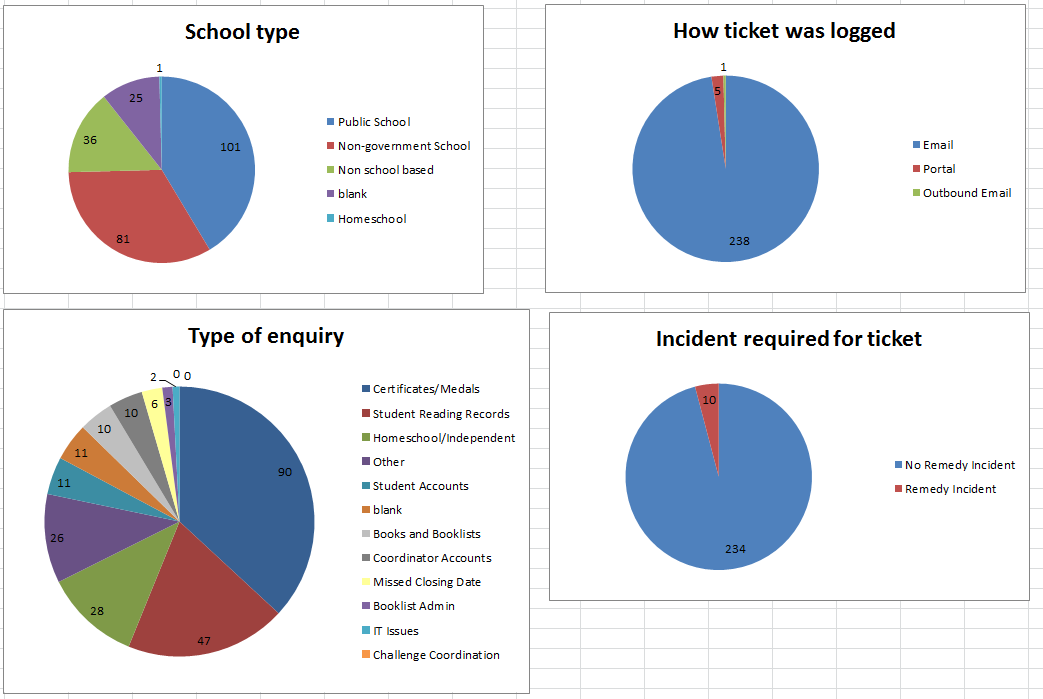
- which school sector is requiring the most support
- where tickets are being logged from
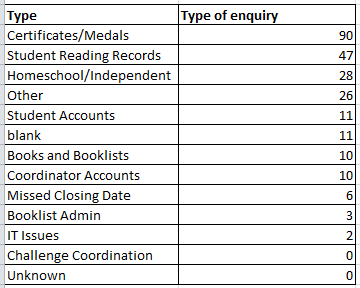
- the type of tickets that are most commonly being logged
- what proportion of tickets require an escalation to ITD
An example of this type of report can be found at \\0797taulewsf01.central.det.win\corp-data\PRC\PRC 2015\Website\Support Site\Service Desk\Reports\tickets-November-24-2015.xlsx
- add a filter to the data in your spreadsheet - click on the Sort & Filter button and select Filter
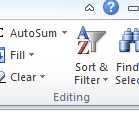
this will add a little downwards pointing triangle to the header information in each column
if you click on this triangle, you are offered the option of filtering what data you can see based on the value of that column
for example, scroll across to the column with header 'School Type', click on the triangle, and it will allow you to select whether you want to see rows where School Type is 'Homeschool', 'Non School Based', 'Non-government School', 'Public School' or any combination of these
-
when you perform a filter, the bottom left hand corner of the excel window will tell you how many rows match that criteria
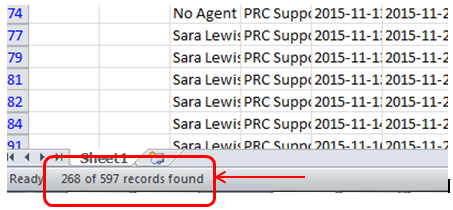
in the example above, I asked to see all rows that have School Type of Public School, this tells me that 268 tickets out of 597 were logged by Public Schools
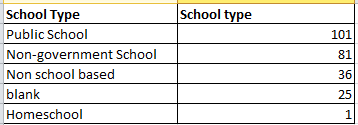
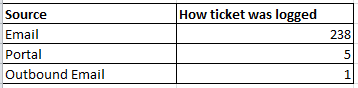

To be able to track the peaks and troughs of support, I recommend reporting on a consistent set of data at least once a month.