
It is important to take a regular back up of all the ticket and knowledge base data contained within Freshdesk. This enables the data to be searched independently of Freshdesk and also can potentially be imported into a different system/application if required.
Freshdesk provides the facility to have all data emailed to you.
- Admin > Account Settings > Account
- on the right hand side of the screen, click on the Export now > button
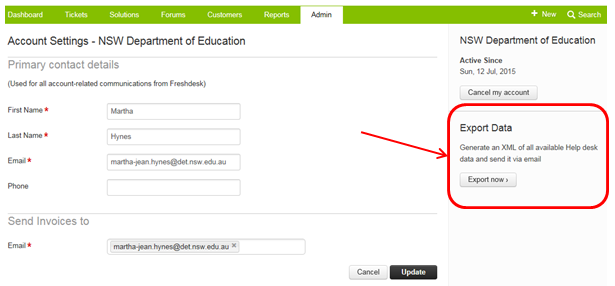
when you press the button, a message will appear at the top of the screen telling you the data will be emailed to your shortly
The email will include a link to the data export that you can download. It will be a zip file (a compressed file format that contains separate files with the ticket, knowledge base and customer information). Click on this link. Choose the option to 'Save' the file.
Save a copy of the zip file to \\0797taulewsf01.central.det.win\corp-data\PRC\PRC 2015 (update the year based on the calendar year).
Name the file using the format DataExtract_yyyymmdd.zip
eg an export done on the 1st December 2015 would be named DataExtract_20151201.zip
The zip file contains a number of xml files, which in turn contain all the data from the PRC Support site. The xml files are
- Companies.xml - all the companies data in PRC Support
- Forums.xml - all the forums data in PRC Support (note that we do not use this functionality at this time)
- Groups.xml - all the groups data in PRC Support (which support agents are members of which groups)
- Solutions.xml - all the knowledge base article content
- Tickets0.xml, Tickets1.xml, Tickets2.xml etc - a number of files that contain the ticket data from PRC Support
- Users.xml - all the user data (customers, agents etc) in PRC Support