
While duplicate accounts are less common at public schools, they still happen occasionally and cannot be resolved without raising a ticket with ITD.
NOTE: SCROLL TO BOTTOM FOR PRC TEAM ACTION
Duplicate public accounts occur when a student's DoE ID has been regenerated.
This happens when:
- A student's name was spelled incorrectly upon enrolment and later corrected
- A student's name was changed (e.g. change of surname) AND a request to regenerate the DoE ID occured
- A student's DoE ID was originally generated based on their legal name and then changed to match their preferred name (or vice versa)
- A student left the public system then returned to the public system, or changed schools at the same time the shortened DoE ID was rolled out
This occurs because the API between the PRC and ERN is only set to "look" for the DoE ID. If this changes, the PRC site keeps the old DoE ID, and will pick up the new DoE ID as a new, distinct account.
Some examples of what this looks like includes:
Change of DoE ID to preferred name:
This student's full legal name is Conall Mac Gearailt Hudzina. At some point, their preferred name was changed to just Conall Hudzina, and the DoE regenerated (note - a preferred name can be changed WITHOUT updating the DoE ID)
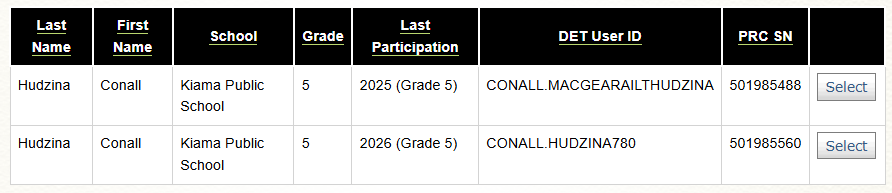
Incorrect spelling corrected:
A typo upon registration (Elena Claek) was later corrected, creating a new account with the correct spelling. You can see this is the case when the DoE ID has a different spelling to the student name.
.

Student left then re-enrolled
This student was enrolled at Arncliffe West Infants School, then moved to Athelstane PS at the same time the shortened DoE ID was rolled out. In this instance, the shortened ID (ZR1998) will always be the correct/current account

If the correct DoE ID is not clear, before proceeding:
-Ask the coordinator to confirm what DoE ID the student uses to log into their account, OR
-If you have ERN access, look up the student in ERN and check the DoE ID. The account listed here is the correct account
PRC team action:
1. Merge any challenge history from the OLD account into the NEW account (note: if there are validated reading records for the SAME year across both accounts, you will need to delete one of these for the merge to proceed)
2. Lodge a ticket with ITD using ServiceNow requesting the OLD DoE ID be deleted. Provide the school name and student DoE ID.
3. Inform the coordinator that you have merged the challenge histories across to the student's active account, and inform them that you have submitted a ticket with ITD to delete the duplicate account, and that the duplicate account should disappear within 2-3 days.
Close the ticket (we don't follow up on these)